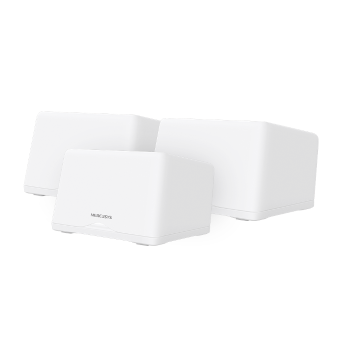
Halo H47BE [V2] 2-pack | BE9300 全屋 Mesh 三頻 Wi-Fi 7 路由器 (支援2.5G光纖)


Halo H47BE
BE9300 全屋 Mesh 三頻 Wi-Fi 7 路由器 (支援2.5G光纖)
- Blazing-Fast 9.3Gbps Tri-Band Speeds: Enables your devices to run at full speed. Enjoy fluent 4K/8K streaming, immersive AR/VR gaming, and blazing-fast downloads.‡
- Newest WiFi 7: Armed with the 320 MHz channels, 4K-QAM, MLO, the 6 GHz band, and other features that WiFi 7 offers, your network will arrive with a jaw-dropping performance.△
- Seamless Roaming for a Smooth Network Experience: No more sudden signal drops or lagging WiFi when you're walking around the house.†
- Multi-Link Operation (MLO): Increases throughput, reduces latency, and improves reliability for emerging applications.△
- 3× 2.5G Ports: 3× 2.5 Gbps WAN/LAN auto-sensing ports break through the 1G bottleneck, driving your devices to peak performance.**
- Whole Home Multi-Gigabit Coverage: Halo mesh units work as a unified network to fill your home up to 6,000 ft2/550 m2 (ideal for 3-5 bedroom houses).‡
- Easy Setup and Use: Network management has never been easier with the MERCUSYS app.
*Please note that the Halo H series and S series cannot work together.
Build an Amazing Mesh Network and Bring it to a New World
BE9300 Whole Home Mesh WiFi 7 System


6,000 ft2/550 m2
Amazing 9.3 Gbps Tri-Band WiFi 7 Leads to An Amazing Experience
WiFi 7 updates the QAM from 1024 to 4096, uses the wider 320 MHz channels and the new 6 GHz band to make Halo H47BE reach a 9214 Mbps speed. You can enjoy the smooth network with this fast speed and specially clean band.‡
 5760 Mbps
 2880 Mbps
 688 Mbps
WiFi 7 Brings Your Network to a Next Level
WiFi 7, the latest WiFi standard, has arrived with jaw-dropping performance—offering accelerated throughput, lower latency, stronger anti-jamming, and higher efficiency. Join the pros and experience the sheer performance of the next generation of WiFi.△
-
New 6 GHz Band for Faster Speeds
-
Double the Channel Width and Speeds
-
Packs 20% more
data than WiFi 6 -
4× Lower
Latency -
More Connection Over 200 Devices
-
Multi-Link
Operation
Build A Multi-Gigabit Mesh Network to Fully Cover Your Home
Halo mesh units work as a unified network with a single network name and password to eliminate weak signal areas. It can choose the best signal and enjoy the best connections.† Halo H47BE matches 2.5G ISP network access with 3× 2.5 Gbps WAN/LAN autosensing ports. The other port can be utilized as a LAN port connection for devices or as a wired backhaul between Halo H units. In this approach, it offers the best 2.5 Gbps connectivity for a real 2.5G era, whether it is wired or wireless.**
2 Pack Covers up to
6000ft2 / 550m2
True Seamless Roaming with One Unified Network
The Halo system automatically connects your phones or tablets to the fastest node, delivering a truly seamless network experience. No more sudden signal drops or lagging WiFi when you’re walking around the house.†
Full 2.5 Gbps Ports for a Higher Network Performance
Equipped with 3× 2.5 Gbps WAN/LAN auto-sensing ports. Halo H47BE allows you to take full advantage of your broadband speed. Plug your PCs, smart TVs, or game consoles into the ports for blazing-fast wired connections.**
-
① Multi-Gig Internet Access

-
② 2.5 Gbps Wired Connection
 Desktop 4K HDTV Computer
Easy Setup and Management via the MERCUSYS App
Follow the on-screen directions to set up your network.
-
Step 1
Find what you’ll need in the box
 Halo Power Cable Ethernet Cable
 -
Step 2
Plug in your devices

-
Step 3
Follow the on-screen directions with the app to configure the main Halo

-
Step 4
Power up the included add-on unit and it will automatically join the network

-
Parental Controls
-
Check the Status of Connected Devices
-
Quality of Service
-
Guest Network
-
New Device
Access Alert -
Monthly Reports


Easily Extend Your Coverage
The Halo Whole Home WiFi kit includes multiple units to fit any type of your house. If that’s not enough, you can expand Mesh WiFi coverage anytime by simply adding more Halos.*
*Please note that the Halo H series and S series cannot work together.
Powerful and Beautiful
†Seamless roaming requires clients to support 802.11k/v/r and may require additional setup. Performance may vary depending on the client device. ‡Maximum wireless signal rates are the physical rates derived from IEEE Standard 802.11 specifications. Over 200 device connections is based on laboratory test data, which analyzed the connections of different devices on the 6 GHz, 5 GHz, and 2.4 GHz bands simultaneously. These devices simulated a typical home scenario by running simultaneous applications in the same room that included 4K video, 1080p video, 720p video, file downloading, web browsing, IP cameras, and other loT devices. Actual wireless data throughput, wireless coverage, and connected devices are not guaranteed and will vary as a result of internet service provider factors, network conditions, client limitations, and environmental factors, including building materials, obstacles, volume and density of traffic, and client location. △Use of Wi-Fi 7 (802.11be), Wi-Fi 6 (802.11ax), and features including Multi-Link Operation (MLO), 320 MHz Bandwidth, 4K-QAM, Multi-RUs, OFDMA, and MU-MIMO requires clients to also support the corresponding features. The 320 MHz bandwidth is only available on the 6 GHz band. Simultaneously, the 320 MHz bandwidth on the 6 GHz band and 160 MHz bandwidth on the 5 GHz band may be unavailable in some regions/countries due to regulatory restrictions. Double channel width and speed refer to 320 MHz compared to 160 MHz for Wi-Fi 6 routers. This Halo may not support all the mandatory features as ratified in the IEEE 802.11belax specification. Further software upgrades for feature availability may be required. §Use of WPA3 requires clients to also support the corresponding feature. *Please note that the Halo H series and S series cannot work together. Halo H47BE is compatible with other units from the Halo H series to form a Mesh network. **2.5 Gbps internet speeds require compatible service plans and equipment. All WAN/LAN ports will operate as either WAN or LAN ports. Only one port can serve as a WAN port at a time. Actual network speed may be limited by the rate of the product's Ethernet WAN or LAN port, the rate supported by the network cable, internet service provider factors, and other environmental conditions. WAN port at a time.
MERCUSYS
Mercusys App 為您提供最簡單的方法,以便在幾分鐘內設定,讓您無論在家與否都能輕鬆透過iOS/Android設備管理您的WiFi。
MERCUSYS 讓您輕鬆完成設定
您不需要閱讀複雜的技術說明或指令,只需要依照APP的步驟就可以在幾分鐘內完成網路設定。
-
 Halo Power Cable Ethernet Cable
步驟 1
在包裝中找到安裝所需的東西
-

步驟 2
插入設備電源和網路線
-

步驟 3
按照Mercusys app的步驟完成設定
即時管理您的WiFi
Mercusys app可透過IOS或Android裝置進行管理,您可以查看目前有多少設備連接到網路並控管。


註:設定頁面可能依據不同型號而有所差異,請依據實際型號為準。
家長監護
輕鬆設定上網時間及網站內容過濾,給孩子建立健康的上網環境。
-
建立用戶設定檔
為您要管理的每個家庭成員新增設定檔,將設備分配給設定檔來設定過濾層級和時間限制
-
上網時間限制
設定孩子每日可以上網的時間,在做作業或睡覺時間時停止他們上網。
-
設定過濾層級
依年齡層選擇過濾層級,為孩童封鎖不適當的內容。
-
暫停網際網路連線
可隨時暫停家庭成員的網路連線,共同享受家庭的相聚時光。
管理您的家庭網路
Mercusys App 讓您出門都能透過iOS/Android設備管理您的WiFi。

檢查連線裝置的狀態
直觀而快速的確認每個Halo網路是否正常運作,有哪些裝置連線、依需求優化或封鎖裝置等網路狀況也能快速查看。

流量管理(QoS)
優先傳輸您指定的裝置封包,提供特定裝置更好的效能。

新裝置連線通知
當有新裝置連接您的Wi-Fi時,Mercusys App將傳送通知。若是未經您許可連線的裝置,可點擊封鎖裝置避免安全性風險。

設定訪客網路
提供另外的網路名稱給訪客使用,保護您主要網路的安全性和隱私。
支援多國語言
Mercusys app 支援多達26種語言,讓全球用戶提供簡單的網路管理。
-
English
-
Nederlands
-
Français
-
Deutsch
-
Italiano
-
日本語
-
한국어
-
Português
-
Español
-
繁體中文
-
Русский язык
-
Português Brasil
-
Español
(Latinoamérica) -
Български
-
Українська мова
-
Polski
-
Română
-
Slovenčina
-
ไทย
-
Türkçe
-
Čeština
-
Tiếng Việt
-
Eλληνικά
-
Bahasa Melayu
-
Magyar
-
עברית
- 無線網路
- 無線標準
6 GHz: IEEE 802.11be
5 GHz: IEEE 802.11a/n/ac/ax/be mixed
2.4 GHz: IEEE 802.11b/g/n/ax/be mixed
- 訊號速率
5760 Mbps at 6 GHz
2880 Mbps at 5 GHz
688 Mbps at 2.4 GHz
- 接收靈敏度
2.4G: -96dBm
5G: -95dBm
6G: -96dBm
- 傳輸功率
5G band1 band2<23dBm
5G band3<30dBm
6G<23dBm
- 無線安全性
WPA-PSK/WPA2-PSK/WPA3-SAE
- Mesh 協定
802.11k/v/r
- 軟體功能
- 運作模式
Router, Access Point
- 服務品質(QoS)
WMM
- WAN 連接類型
Dynamic IP/Static IP/PPPoE/L2TP/PPTP
- 管理
Local Management, Remote Management, Multi-Managers
- DHCP
Server, Client
- 防火牆安全性
SPI Firewall
- 協定
Supports IPv4 and IPv6
- 訪客網路
2.4 GHz Guest Network
5 GHz Guest Network
6 GHz Guest Network
- 硬體功能
- 尺寸大小(長 X 寬 X 高)
6.69 × 4.82 × 4.07 in (170 × 122.4 × 103.5 mm)
- 連接介面
3× 2.5 Gbps Ports (WAN/LAN auto-sensing)
- 按鈕
Reset button
- 其他
- Network Services Enabled by Default
Web Server
Manage and configure device through web (HTTP/HTTPS)
• Port: 80/443; Protocol: TCP
DHCP Server
IP address assignment (DHCP)
• Port: 67; Protocol: UDP
DNS
DNS
• Port: 53; Protocol: TCP & UDP
App management
Manage and configure device through app
• Port: 20001; Protocol: TCP
• Port: 20002; Protocol: UDP
- 包裝內容
2-pack
2× Halo H47BE Units
1× RJ45 Ethernet Cable
2× Power Adapters
Quick Installation Guide- 環境
Operating Temperature: 0°C~40°C (32°F~104°F)
Operating Humidity: 10%~90% Non-Condensing
Storage Humidity: 5%~90% Non-Condensing