How to adjust Image Style and Image Brightness on MERCUSYS Camera
Introduction
The image style feature applies predefined parameters to adjust color in the camera output. The brightness control allows manual adjustment of overall exposure. This article provides instructions for configuring both image style and brightness settings on MERCUSYS cameras.
Configuration
Step 1. Open the MERCUSYS app and select the camera you want to configure. Tap Manage to enter the Live View page, then tap the gear icon to access Device Settings.
Step 2. Navigate to Video & Display > Image Settings to select an image style and adjust image brightness.
Image Style offers four options: Original, Cool, Warm, and Soft.
Brightness is adjustable from 1% to 100%.
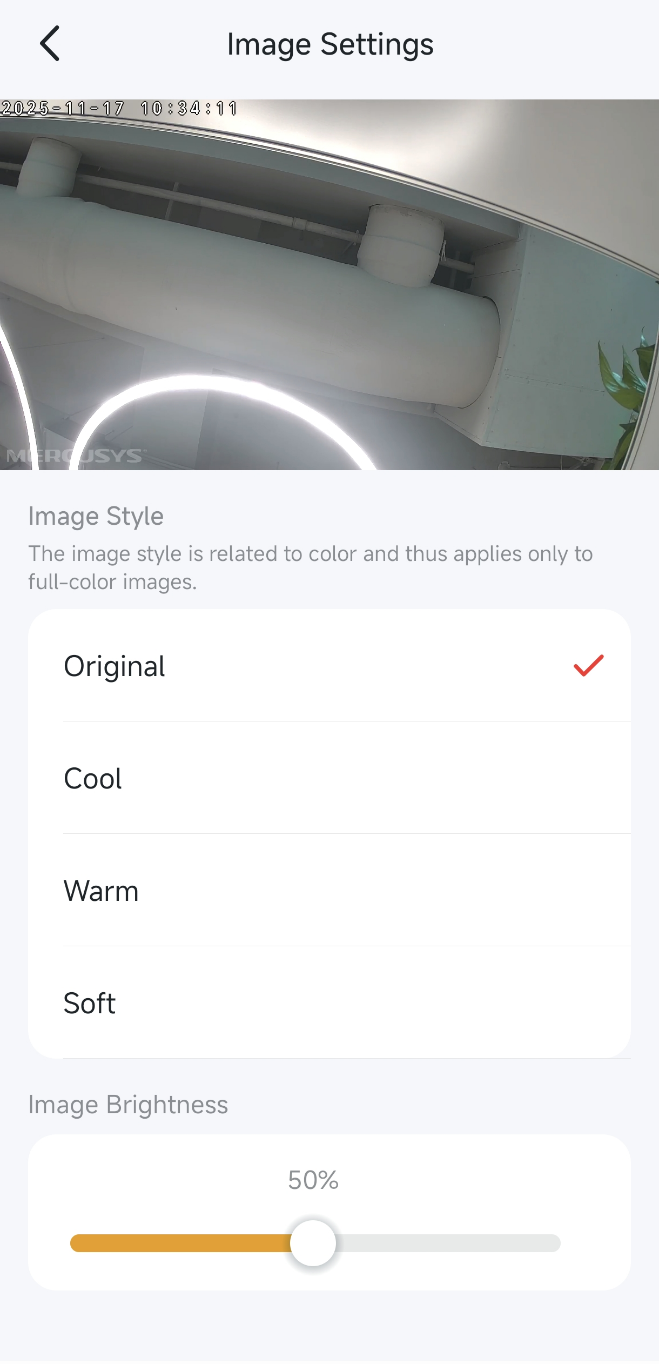
Note: Image style is related to color and thus applies only to full-color images. Excessive brightness may cause loss of some picture details.
Get to know more details of each function and configuration please go to Support Center to download the manual of your product.