What can I do if my MERCUSYS camera frequently stucks or reboots?
Introduction
If you are experiencing frequent camera freezes, system lockups, or unexpected automatic reboots, this troubleshooting guide outlines the possible causes and provides steps to help you identify and resolve the issue.
Possible Causes and Troubleshooting
1. Outdated Firmware
Ensure that your camera is running the latest firmware version available.
2. SD Card Compatibility Issue
Some SD cards are not designed for continuous surveillance recording. Using incompatible or low-endurance SD cards may cause issues such as recording abnormalities, camera freezing, or unexpected reboots.
To troubleshoot:
1) Temporarily remove the SD card and check whether the issue persists. If the problem is SD card-related, we recommend using a high-endurance microSD card specifically designed for surveillance recording.
For more SD card options, please refer to What type of microSD card does MERCUSYS Camera support?.
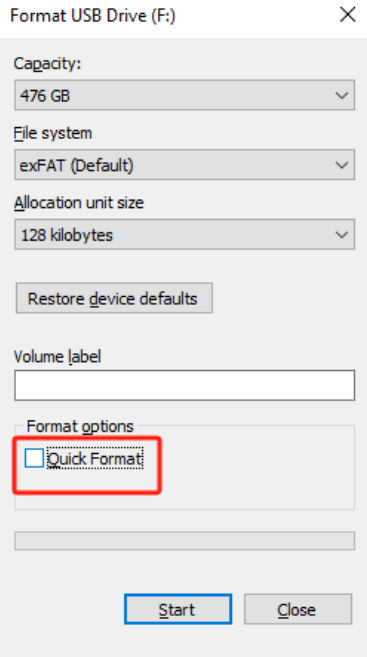
2) You can also try formatting the SD card on a PC. Please disable "Quick Format" when formatting. Then insert it into the camera and format it again.
3. Third-Party App Interference
Some cameras support the ONVIF protocol, allowing control through third-party software or apps. However, some third-party apps may not fully comply with protocol standards, which can cause abnormal behavior.
If you are using third-party software or apps to control the camera, temporarily remove them to determine whether the issue is resolved.
4. Power Supply Issues
1) Use the original power adapter provided with the camera.
2) Ensure the power connector is securely plugged into the camera.
3) Avoid using extension cords, especially for outdoor installations, as they may increase the risk of lightning damage and may void the warranty.
4) If an extension cord is necessary, use one with 22 AWG or thicker wiring to minimize voltage drop and ensure stable power delivery.
5) Confirm that your power source is stable.
5. Overheating
Overheating may lead to system instability or automatic reboots.
Here are some suggestions for the camera's position:
1) Install the camera in a well-ventilated area.
2) Avoid placing the camera inside enclosed spaces.
3) Keep the camera away from heat sources that could raise the operating temperature.
If the issue persists after completing the steps above, please contact our technical support for further assistance.