MB110-4G [V1] | 300 Mbps Wireless N 4G LTE Router
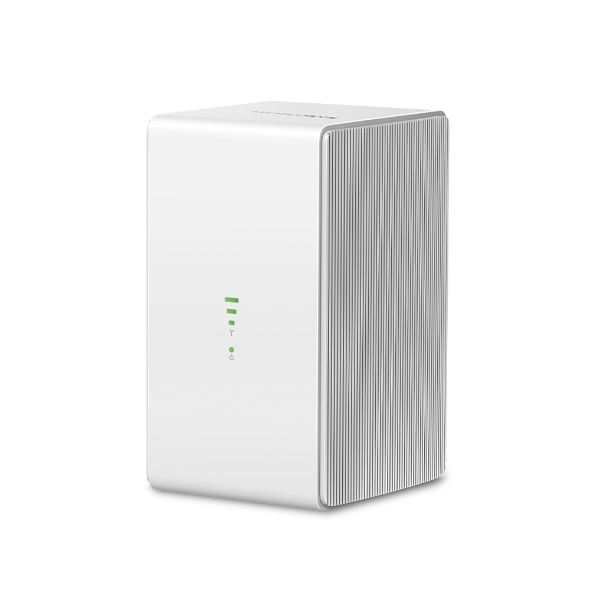


MB110-4G
300 Mbps Wireless N 4G LTE Router
- 4G-hálózat – Ossza meg az internet-hozzáférést akár 32 Wi-Fi-eszközzel, és élvezze az akár 150 Mbit/s letöltési sebességet
- Helyezze be a SIM-kártyát, és már használhatja is – Nincs szükség konfigurálásra, a SIM-kártyák kompatibilitását többéves gyakorlati tesztelés biztosítja
- 300 Mbit/s-os WiFi – Akár 300 Mbit/s-os gyors WiFi-sebesség hálózata megosztásához
- Wi-Fi router mód – Ha nem érhető el 4G-kapcsolat, csatlakoztasson Ethernet-kábelt a LAN/WAN-porthoz a rugalmas internet-hozzáférés érdekében
-
watch video: How to Set Up MERCUSYS 5G/4G Router (MB110-4G as an example)
How to Set Up MERCUSYS 5G/4G Router (MB110-4G as an example)
4G LTE
Cat akár 150 Mbit/s
Elérhető WAN/LAN-kapcsolat
Akár
32
eszköz csatlakoztatása
Gyors WiFi akár 300 Mbit/s sebességgel
Külső antennaport
SIM-kártyás Plug and Play
Szupergyors 4G LTE-sebesség a megbízható Wi-Fi-ért
4G routerként az MB110-4G a 4G LTE technológiával akár 150 Mbit/s letöltési és 50 Mbit/s feltöltési sebességet ér el.
Emellett akár 300 Mbit/s maximális sebességű, 2,4 GHz-es Wi-Fi-hálózatot is megoszthat játékhoz, streameléshez és egyebekhez.
50 Mbit/s
150 Mbit/s
300 Mbit/s 2,4 GHz
4G LTE
Kényelmes 4G-hozzáférés SIM-kártyával
Teljes mértékben kompatibilis az FDD-LTE és TDD-LTE szabványokkal, így világszerte a legtöbb szolgáltatóval működik. Helyezzen be egy nano SIM-kártyát, kapcsolja be a routert, és ossza meg 4G LTE-hálózatát több Wi-Fi-eszközzel.
Elérhető tartalék WAN-kapcsolat
A teljes funkcionalitású WAN/LAN-portnak köszönhetően az MB110-4G routerként is működhet, kompatibilis kábel-, optikai és DSL-modemekkel, illetve internetkapcsolatot biztosíthat vezetékes eszközök számára.
A megbízható hozzáférést egyszerre akár 32 eszköz használhatja.
Ethernet WAN
4G LTE Cat 4
Vezeték nélküli eszközök
Vezetékes eszközök
Wi-Fi ott, ahol szüksége van rá
Élvezze a páratlan kényelmet és sokoldalúságot. Az eszközt éveken át gyakorlati körülmények között tesztelték az univerzális kompatibilitás biztosítása érdekében, fejlett LTE-antennái pedig folyamatos kapcsolatot nyújtanak. Élvezze a gyors és stabil Wi-Fi-t, akár otthon tartózkodik, akár távolról dolgozik.
-

Tárgyaló
-

Ideiglenes üzlet

Távoli terület

Nyaraló
*Actual network speed may be limited by the rate of the product's Ethernet WAN or LAN port, the rate supported by the network cable, Internet service provider factors and other environmental conditions.
MERCUSYS
The MERCUSYS app provides the easiest way for you to set up in minutes and manage your WiFi at home or away through your iOS or Android devices.


MERCUSYS Helps You Set Up in A Few Steps
Without any technical know-how or reading complicated instructions, simply follow the in-app instructions. Set up your mesh network in minutes.
-
 Halo Power Cable Ethernet Cable
Step 1
Find what you’ll need in the box
-

Step 2
Plug in your devices
-

Step 3
Follow the on-screen directions with the MERCUSYS app
Manage Your WiFi in Real Time
With the MERCUSYS app, experience live network management. See who’s connecting to your network and manage it at any time with your iOS or Android devices.
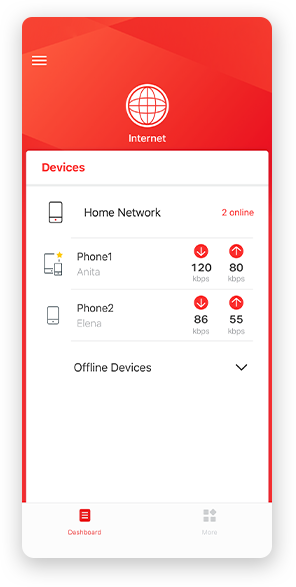
Notice: The configuration page of different models may be different, please refer to the actual one.
Powerful Parental Controls
Easily manage your kids’ online time and content to create a safe and healthy online environment.
-
Create User Profiles
Create a profile for each family member you would like to manage. Assign devices to the profile to set access controls and time limits for them.
-
Online Time Limits
Set daily limits on how long your kids spend online and prevent them from accessing the internet on their devices for a long time to build a healthy network habit.
-
Block Inappropriate Websites
Control which sites your kids visit by setting a block list.
-
Pause Internet Connection
Suspend family members’ internet connections to take a break from the virtual world to enjoy some family time.
Manage and Secure Your Home Network
The MERCUSYS app helps you manage your WiFi at home or away through your iOS or Android devices.

Check the Status of Connected Devices
Intuitively view the working status of your Halo network and see what is connected. Prioritize or block devices as needed.

Quality of Services
Prioritizes devices you select to perform better.

New Device Access Alert
The MERCUSYS app proactively sends out an alert to inform you when an unfamiliar device is connected. Tap to block the device if it is a security risk.

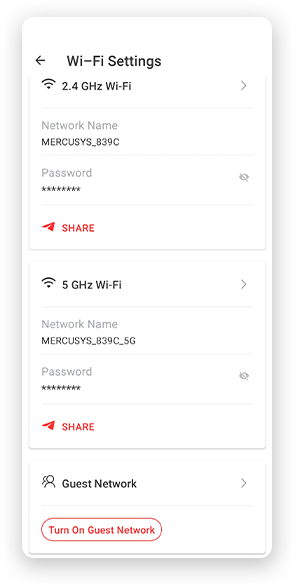
Set Up a Guest Network
Provides a separate network for guests to ensure your security and privacy.
Everything in One App
Whether you’re looking to control a wide range of MERCUSYS routers, extenders, or Halo mesh systems, find it all on the app.
See what’s compatibleCompatible Products
Note: The device's firmware requires the latest version. Click here to learn how to upgrade your firmware.
Note: Both listed and higher hardware versions of these models are compatible with the MERCUSYS app.
Supporting Multiple Languages
MERCUSYS app supports up to 26 languages, enabling easy network management for users all over the world.
-
English
-
Nederlands
-
Français
-
Deutsch
-
Italiano
-
日本語
-
한국어
-
Português
-
Español
-
繁體中文
-
Русский язык
-
Português Brasil
-
Español
(Latinoamérica) -
Български
-
Українська мова
-
Polski
-
Română
-
Slovenčina
-
ไทย
-
Türkçe
-
Čeština
-
Tiếng Việt
-
Eλληνικά
-
Bahasa Melayu
-
Magyar
-
עברית
-
Vezeték nélküli

| Vezeték nélküli szabványok | IEEE 802.11b/g/n |
|---|---|
| Frekvencia | 2.4 GHz |
| Wi-Fi sebesség | 300 Mbps |
| Vételi érzékenység | 11g 54M: -74 dBm |
| Átviteli teljesítmény | < 20 dBm (2.4 GHz) |
| Vezeték nélküli biztonság | WPA-PSK / WPA2-PSK |
| Vezeték nélküli funkciók | Enable/Disable Wireless Radio, Wireless Schedule, WMM, Wireless |
-
Software
| DHCP | Server |
|---|
-
Hardware
| Dimenziók | 90×92×150.5 mm |
|---|---|
| Interfészek | 1× 10/100Mbps LAN/WAN Port 1× 10/100Mbps LAN Port 2× 4G/3G External Antenna Ports 1× Nano SIM Card Slot |
| Gomb | WPS/Reset Button |
| Ethernet Port | 1× 10/100 Mbps LAN/WAN Port + 1× 10/100 Mbps LAN |
| Hálózati típus | EU: FDD-LTE: B1/B3/B5/B7/B8/B20/B28 (2100/1800/850/2600/900/800/700 MHz) TDD-LTE: B38/B40 (2600/2300 MHz) HSPA+/UMTS: B1/B5/B8 (2100/850/900 MHz) UN: FDD-LTE: B1/B2/B3/B4/B5/B7/B8/B28/B66 (2100/1900/1800/1700/850/2600/900/700/1700 MHz) TDD-LTE: B40 (2300 MHz) HSPA+/UMTS: B1/B2/B4/B5/B8 (2100/1900/1700/850/900 MHz) |
-
Egyéb
| A csomag tartalma | 300 Mbps Wireless N 4G LTE Router (MB110-4G) Power Adapter RJ45 Ethernet Cable Quick Installation Guide |
|---|---|
| Környezet | Operating Temperature: 0°C~40°C (32°F~104°F) Storage Temperature: -40°C~60°C (-40°F~140°F) Operating Humidity: 10%~90% Non-Condensing Storage Humidity: 5%~90% Non-Condensing |