MR78X [V1] | AX2700 Dual-Band Wi-Fi 6 Router


MR78X
AX2700 Dual-Band Wi-Fi 6 Router
OPTIMAL WIFI 6 SPEEDS – Optimal WiFi 6 speeds reaching up to 2.7 Gbps for faster browsing, streamings, and downloading, all at the same time.
MORE DEVICES, MORE FUN – Supports MU-MIMO and OFDMA to reduce congestion and quadruple the average throughput.
WiFi THAT GOES FARTHER – 4× multi-directional antennas with Beamforming boost stable connections throughout your home for strong WiFi signals in every corner
SECURE VPN ACCESS – Easily set up VPN client or server modes directly on the router. Ideal for secure remote access, private browsing, and major protocols compatibility, including WireGuard, OpenVPN, L2TP/IPSec, and PPTP.
OVERALL SECURITY PROTECTION – The latest WPA3 provides improved WiFi security
GIGABIT WIRED CONNECTIONS – Make full use of your internet access and transfer data at dizzying speeds for peak performance
LESS WIFI INTERFERENCE – Minimizes the interference from neighboring signals to improve transmission efficiency with BSS coloring
SMART CONNECT – Intelligently chooses the best available band for each device
-
watch video: How to Set Up EasyMesh with MERCUSYS Router (Taking MR47BE V2 as an example)
How to Set Up EasyMesh with MERCUSYS Router (Taking MR47BE V2 as an example)
Dual-Band 2700 Mbps
Ultra-Fast Wi-Fi
Full Gigabit Ports
Wider Coverage
EasyMesh
Secure VPN Access
Parental Control
Multi-Mode
MERCUSYS App
Abundant Features
Ultra-Fast Dual Band Wi-Fi
Enjoy lightning-fast 2402 Mbps on 5 GHz for streaming and gaming, and reliable 300 Mbps on 2.4 GHz for browsing and smart devices. MR78X balances speed and coverage for the whole home.**
Full Gigabit Connectivity
With 1× Gigabit WAN port and 3× Gigabit LAN ports, MR78X ensures stable, ultra-fast wired connections for PCs, smart TVs, and gaming consoles. No bottlenecks, just seamless data flow.
Internet Access
Wireless Connection
Stronger, Wider Coverage
Equipped with four high-gain antennas, MR78X expands coverage to every corner and enhances wall-penetration performance, ensuring a stable connection even across rooms.
without Beamforming
Cover Your Whole Home with EasyMesh
MR78X is compatible with EasyMesh, enabling you to set up a whole home mesh network with one WiFi name and password with any other APs that support EasyMesh from multiple vendors. Enjoy flexible, scalable, and seamless mesh WiFi throughout your home.△
-

Flexible WiFi Range Expansion
-

Works with Different Vendors
-

Seamless WiFi Connections
-
Traditional Router and Extender
-

Router and Extender Compatible with EasyMesh
Smarter VPN, Safer Internet
Supports OpenVPN, WireGuard, PPTP, and L2TP/IPsec — works with 35+ mainstream providers for safe, flexible access†.
-

35+
Service Provider
-

4+
Flexible Protocols
-

One-Time
Setup
-

High-Speed
Performance‡
The Latest WPA3 Protects Your Personal Network
The latest security standard, WPA3, offers improved comprehensive WiFi protection to defend your devices and private information against brute-force attacks.
Protect Your Kids When They’re Online
Easily manage your kids’ online time and content to create a healthy online environment for all.
Flexible Multi-Mode Functionality
Easy Setup and Management via the MERCUSYS App
Without needing technical knowledge or reading installation instructions in advance, just follow the on-screen directions with the MERCUSYS app to set up your router in minutes. The MERCUSYS app helps you set and manage your WiFi at home or away through your iOS or Android devices.
Learn More about the MERCUSYS App


* Use of 802.11ax (Wi-Fi 6), and features including OFDMA, MU-MIMO, 1024-QAM, BSS Color requires clients to also support the corresponding features. This router may not support all the mandatory features as ratified in Draft 3.0 of IEEE 802.11AX specifications. Further software upgrades for feature availability may be required.
** Maximum wireless signal rates are the physical rates derived from IEEE Standard 802.11 specifications. Actual wireless data throughput and wireless coverage are not guaranteed and will vary as a result of 1) environmental factors, including building materials, physical objects, and obstacles, 2) network conditions, including local interference, volume and density of traffic, product location, network complexity, and network overhead, and 3) client limitations, including rated performance, location, connection, quality, and client condition.Actual network speed may be limited by the rate of the product's Ethernet WAN or LAN port, the rate supported by the network cable, Internet service provider factors and other environmental conditions.
*** The 802.11ax white paper defines standardized modifications to both the IEEE 802.11 physical layers (PHY) and the IEEE 802.11 Medium Access Control (MAC) layer as enabling at least one mode of operation capable of supporting the improvement of at least four times the average throughput per station (measured at the MAC data service access point) in a dense deployment scenario.
**** Use of WPA3 requires clients to also support WPA3. 5. "256 devices" is the combined total connections for 2.4 GHz and 5 GHz under laboratory conditions.
△ EasyMesh-compatible products can network with other devices that use EasyMesh. Failures may be due to firmware conflicts of different vendors. The EasyMesh-compatible function is still being developed on some models and will be supported in subsequent software updates. This product is compatible with standard EasyMesh technology but has not obtained the Wi-Fi EasyMesh™ certification.
† Tests conducted on a local network. Real world speeds may differ depending on your network configuration.
‡ Subscription fees for VPN services must be purchased separately from the respective VPN providers. Supported VPN protocols (OpenVPN/WireGuard) may differ by provider and usage scenario (e.g., app vs. router setup). Please verify compatibility with the official resources of each VPN service before configuration.
§ Kill Switch support varies by device model. Please refer to your specific model’s specs.
App MERCUSYS
L'app MERCUSYS ti permette di configurare e gestire in modo rapido e semplice la tua rete Wi-Fi domestica ovunque ti trovi, direttamente dal tuo smartphone.
MERCUSYS configura la tua rete in pochi step
Configurare la tua rete domestica richiede pochissimi passaggi con app MERCUSYS. Non dovrai decifrare complicati manuali o avere conoscenze tecniche pregresse: segui semplicemente le istruzioni in-app per creare il tuo network in pochi minuti.
-
 Halo alimentazione cavo Ethernet
Step 1
Apri la confezione
-

Step 2
Collega i dispositivi
-

Step 3
Segui le istruzioni di MERCUSYS app
Gestisci il tuo WI-Fi in tempo reale
MERCUSYS app ti permette di tenere sotto controllo la rete in qualunque momento. Verifica gli utenti connessi alla rete e monitorane le attività dal tuo dispositivo iOS o Android.
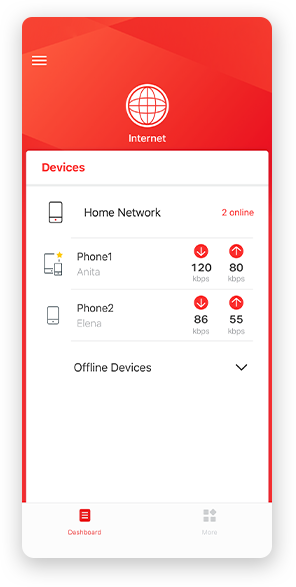
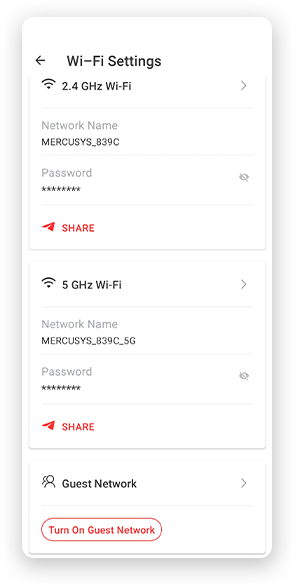
NB.La pagina di configurazione può variare a seconda del modello.
Parental Control
Crea un ambiente di rete sicuro per i tuoi bambini con la funzionalità Parental Control.
-
Crea Profili Utente
Crea un profilo per ogni membro della famiglia e assegna a ciascuno i suoi dispositivi per impostare il controllo accessi e le limitazioni di tempo.
-
Online Time Limit
Imposta limiti alla permanenza in rete per evitare eccessi.
-
Black-list
Blocca contenuti inappropriati limitando l'accesso a determinati siti con le black list.
-
Sospendi la connessione
Goditi qualche istante in famiglia sospendendo la connessione per tutti!
Gestione intuitiva
MERCUSYS app mette a tua disposizione una serie completa di funzionalità per gestire la rete in modo semplice e sicuro tramite dispositivo iOS o Android.

Controlla lo Status dei dispositivi connessi
Osserva in modo intuitivo lo stato della rete e dei dispositivi connessi. Puoi dare priorità o bloccare alcuni dispositivi, se necessario.

Quality of Services
Dai priorità alle applicazioni e ai dispositivi che ne hanno più bisogno per ottenere le migliori performance di connessione.

Notifica di nuovo accesso
MERCUSYS app ti informa quando un nuovo dispositivo accede alla tua rete inviando una notifica istantanea. In questo modo puoi bloccare tempestivamente il dispositivo, se ritieni che rappresenti una minaccia alla sicurezza.

Rete Ospiti
Crea una rete WI-Fi separata per i tuoi ospiti mantenendo inalterata la sicurezza del network prinipale e la tua privacy.
Prodotti compatibili
Nota: I prodotti presenti nella lista e le versioi hardware successive sono compatibili con MERCUSYS app.
CATEGORIE
-
Halo Mesh
-

Halo H50G V1 EU
AC1900 Whole Home Mesh Wi-Fi System
-

Halo H30G V1 EU
AC1300 Whole Home Mesh Wi-Fi System
-
-
Router Wi-Fi
-

MR30G V1 BR
AC1200 Wireless Dual Band Gigabit Router
-

MR70X V1 EU/US
AX1800 Dual Band Wi-Fi 6 Router
-

MR50G V1 EU/US/RU
AC1900 Wireless Dual Band Gigabit Router
-
Coming Soon

MR30G V1 EU/US/RU
AC1200 Wireless Dual Band Gigabit Router
-
-
Range Extender
-
*More compatible devices are coming soon.
-
Supporto multilingua
-
English
-
Nederlands
-
Français
-
Deutsch
-
Italiano
-
日本語
-
한국어
-
Português
-
Español
-
繁體中文
-
Русский язык
-
Português Brasil
-
Español
(Latinoamérica) -
Български
-
Українська мова
-
Polski
-
Română
-
Slovenčina
-
ไทย
-
Türkçe
-
Čeština
-
Tiếng Việt
-
Eλληνικά
-
Bahasa Melayu
-
Magyar
-
עברית
-
Wireless

| Wi-Fi Class | AX2700 |
|---|---|
| Wi-Fi (2.4 GHz) | 300Mbps |
| Wi-Fi (5 GHz) | 2402Mbps |
| Wireless Standards | 802.11ax/ac/a/b/g/n |
| Reception Sensitivity | 5G: 2.4G: |
| Max Channel Width | 160MHz |
| Max Wi-Fi Modulation | 1024 QAM |
| Wireless Security | WPA/WPA2/WPA3 |
| Wireless Functions | Guest Network |
-
Software
| Operation Modes | Router/AP |
|---|---|
| WAN Mode | Dynamic IP |
| DHCP | Address Reservation |
| NAT Forwarding | Port Forwarding |
| Protocols | IPv4 |
| IPTV | IGMP Proxy |
| Guest Network | 2.4G Guest Network |
| Parental Controls | Profile Settings |
| VPN Sever | OpenVPN |
| DDNS | MERCUSYS |
| VPN Client | OpenVPN |
| QoS | Time Settings |
| Easy Mesh | Easymesh Compatible |
| Security | SPI Firewall |
| Kill Switch | Support |
| System Settings | Firmware Upgrade |
| ISP Feature | CWMP |
| Diagnostics | Ping |
| LED Management | LED Control |
| Device Management | MERCUSYS APP |
| Cloud | MERCUSYS ID |
| Language | Bulgarian |
| Advanced Features | OFDMA |
-
Hardware
| Dimensioni (W X D X H) | 175.6 × 157.4× 45 mm |
|---|---|
| Interfaces | 1× GE WAN |
| Antenna | 2× 5G External Antennas |
| Button | 1× WPS Button |
| Installation | Desktop |
| LED | 1× SYS |
| Retail Package Dimension | 310 × 221 × 69 mm |
| Units per Carton | 10 |
| Carton Dimension | 460 × 330 × 370 mm |
| Power Consumption | Input:100~240V, 50/60Hz |
-
Others
| Network Services Enabled by Default | Web Server |
|---|---|
| Package Contents | • AX2700 Wi-Fi 6 Router MR78X |
| Environment | • Operating Temperature: 0°C~40°C (32°F~104°F) |