AC12G [V1, V2] | AC1300 Wireless Dual Band Gigabit Router


- AC1300 kétsávos Wi-Fi – Akár 400 Mbit/s sebesség a 2,4 GHz-es sávon és 867 Mbit/s az 5 GHz-es sávon
- Teljes gigabites portok — Villámgyors kapcsolat vezetékes eszközökhöz, például játékkonzolokhoz, számítógépekhez, okostévékhez és egyebekhez
- Nagy hatótávolságú lefedettség – A 4× nagy nyereségű antenna és a Beamforming stabil kapcsolatot biztosít otthona egész területén, így minden sarokban erős Wi-Fi-jel érhető el
- Nagyobb hálózati hatékonyság – A MU-MIMO technológia lehetővé teszi, hogy az AC12G egyszerre több eszközzel kommunikáljon, növelve a hálózat teljes átviteli teljesítményét
- Smart Connect– Intelligensen kiválasztja az egyes eszközök számára elérhető legjobb sávot
- IPTV- és IPv6-támogatás
-
watch video: Set up your MERCUSYS Wi-Fi Router via a Web Browser-AC12G
Set up your MERCUSYS Wi-Fi Router via a Web Browser-AC12G
-
watch video: How to Set Up EasyMesh with MERCUSYS Router (Taking MR47BE V2 as an example)
How to Set Up EasyMesh with MERCUSYS Router (Taking MR47BE V2 as an example)
Élje digitális életét villámgyorsan
AC1300 kétsávos vezeték nélküli gigabites router
AC12G
867Mbit/s 5GHz
400Mbit/s2,4GHz
1300 Mbit/s-os Wi-Fi a korlátlan otthoni szórakozáshoz
Az erőteljes AC1300 kétsávos Wi-Fi villámgyors internetes szórakozást biztosít. Több egyidejű adatfolyam esetén a 2,4 GHz-es sávon elérhető 400 Mbit/s ideális zene streameléséhez és online vásárláshoz, míg az 5 GHz-es sávon elérhető 867 Mbit/s a nagy sávszélességet igénylő feladatokat, például a HD-streamelést és az online játékot szolgálja ki.
Gigabites sebesség a villámgyors böngészéshez
A négy beépített gigabites Ethernet-port villámgyors vezetékes kapcsolatot biztosít. Élvezze a késésmentes játékot, a gördülékeny HD-videóstreamelést és a nagy sebességű fájlletöltést.
Akár 60 eszköz megbízható, egyidejű csatlakoztatása
Egyszerre akár 60 vezeték nélküli eszközzel, például telefonokkal, táblagépekkel és okosotthon-eszközökkel oszthat meg megbízható vezeték nélküli kapcsolatot. Tökéletesen lefedi minden hálózati igényét, akár házibulit tart, akár a kertben grillezik.
Erős jel, nagy lefedettség
A négy külső, 5 dBi-s antenna nagyobb vezeték nélküli lefedettséget és erősebb Wi-Fi-jelet biztosít, amely nagyobb otthonában vagy irodájában is messzire elér. Felejtse el a gyenge és megszakadó kapcsolatokat.
Gördülékeny IPTV-re tervezve
Az IGMP Proxy/Snooping, Bridge és Tag VLAN technológia lehetővé teszi az adatfolyamok továbbítását meghatározott gigabites LAN-portokon keresztül, optimalizálva a nagy felbontású videók lejátszását.

Fejlett biztonság
A WPA3-titkosítás aktív védelmet biztosít a biztonsági fenyegetésekkel és illetéktelen behatolókkal szemben

2×2 MIMO
Növeli a vezeték nélküli adatátvitel hatékonyságát több eszköz között

Vendéghálózat
Tartsa biztonságban fő hálózatát egy külön vendéghálózat segítségével
*Maximum wireless signal rates are the physical rates derived from IEEE Standard 802.11 specifications. Actual wireless data throughput and wireless coverage are not guaranteed and will vary as a result of 1) environmental factors, including building materials, physical objects, and obstacles, 2) network conditions, including local interference, volume and density of traffic, product location, network complexity, and network overhead, and 3) client limitations, including rated performance, location, connection, quality, and client condition.
MERCUSYS
The MERCUSYS app provides the easiest way for you to set up in minutes and manage your WiFi at home or away through your iOS or Android devices.


MERCUSYS Helps You Set Up in A Few Steps
Without any technical know-how or reading complicated instructions, simply follow the in-app instructions. Set up your mesh network in minutes.
-
 Halo Power Cable Ethernet Cable
Step 1
Find what you’ll need in the box
-

Step 2
Plug in your devices
-

Step 3
Follow the on-screen directions with the MERCUSYS app
Manage Your WiFi in Real Time
With the MERCUSYS app, experience live network management. See who’s connecting to your network and manage it at any time with your iOS or Android devices.
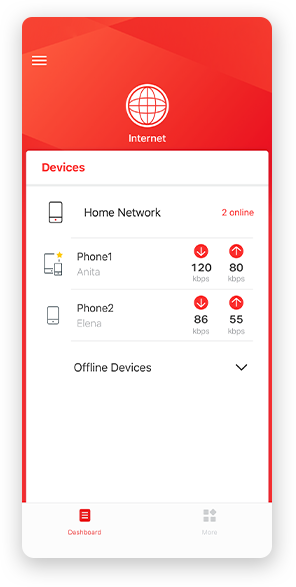
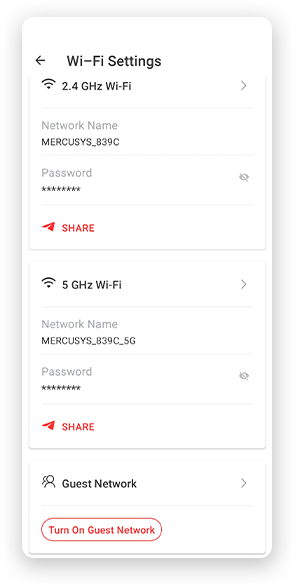
Notice: The configuration page of different models may be different, please refer to the actual one.
Powerful Parental Controls
Easily manage your kids’ online time and content to create a safe and healthy online environment.
-
Create User Profiles
Create a profile for each family member you would like to manage. Assign devices to the profile to set access controls and time limits for them.
-
Online Time Limits
Set daily limits on how long your kids spend online and prevent them from accessing the internet on their devices for a long time to build a healthy network habit.
-
Block Inappropriate Websites
Control which sites your kids visit by setting a block list.
-
Pause Internet Connection
Suspend family members’ internet connections to take a break from the virtual world to enjoy some family time.
Manage and Secure Your Home Network
The MERCUSYS app helps you manage your WiFi at home or away through your iOS or Android devices.

Check the Status of Connected Devices
Intuitively view the working status of your Halo network and see what is connected. Prioritize or block devices as needed.

Quality of Services
Prioritizes devices you select to perform better.

New Device Access Alert
The MERCUSYS app proactively sends out an alert to inform you when an unfamiliar device is connected. Tap to block the device if it is a security risk.

Set Up a Guest Network
Provides a separate network for guests to ensure your security and privacy.
Everything in One App
Whether you’re looking to control a wide range of MERCUSYS routers, extenders, or Halo mesh systems, find it all on the app.
See what’s compatibleCompatible Products
Note: The device's firmware requires the latest version. Click here to learn how to upgrade your firmware.
Note: Both listed and higher hardware versions of these models are compatible with the MERCUSYS app.
Supporting Multiple Languages
MERCUSYS app supports up to 26 languages, enabling easy network management for users all over the world.
-
English
-
Nederlands
-
Français
-
Deutsch
-
Italiano
-
日本語
-
한국어
-
Português
-
Español
-
繁體中文
-
Русский язык
-
Português Brasil
-
Español
(Latinoamérica) -
Български
-
Українська мова
-
Polski
-
Română
-
Slovenčina
-
ไทย
-
Türkçe
-
Čeština
-
Tiếng Việt
-
Eλληνικά
-
Bahasa Melayu
-
Magyar
-
עברית
-
Vezeték nélküli

| Vezeték nélküli szabványok | IEEE 802.11a/n/ac 5 GHz, IEEE 802.11b/g/n 2.4 GHz |
|---|---|
| Frekvencia | EU: 2.4-2.5GHz, 5.17-5.25GHz |
| Wi-Fi sebesség | 400 Mbps at 2.4GHz, 867 Mbps at 5 GHz |
| Vételi érzékenység | 5GHz
|
| Átviteli teljesítmény | <20dBm (EIRP) |
| Vezeték nélküli biztonság | WPA-PSK / WPA2-PSK / WPA3-Personal |
| Vezeték nélküli funkciók | Enable/Disable Wireless Radio, Wireless Statistics |
-
Software
| Menedzsment | Access Control |
|---|---|
| Port Forwarding | Virtual Server, UPnP, DMZ |
| Tűzfal biztonság | IP and MAC Address Binding |
| Vendég hálózat | 2.4 GHz Guest Network, 5 GHz Guest Network |
-
Hardware
| Dimenziók | 8.7 × 5.5 × 1.3 in (222 × 140 × 32 mm) |
|---|---|
| Interfészek | 1× Gigabit WAN Port |
| Gomb | WPS/Reset Button |
| Külső áramellátás | 12V/1A |
| Antenna típus | 4× 5 dBi Fixed Omni-Directional Antennas |
-
Egyéb
| A csomag tartalma | • AC1300 Wi-Fi Router AC12G |
|---|---|
| Környezet | • Operating Temperature: 0°C~40°C (32°F~104°F) |