MR60X [V1, V2] | AX1500 Dual-Band WiFi 6 Router


- Upgrade Your Network with Wi-Fi 6 – MR60X comes equipped with the latest Wi-Fi 6 standard, delivering more simultaneous connections, extend WiFi range, and maintain reliably fast data transmissions.
- Faster 1.5 Gbps Speeds - Optimal WiFi 6 speeds reaching up to 1.5 Gbps (1201 Mbps on the 5 GHz band and 300 Mbps on the 2.4 GHz band)
- Improved Network Capacity – OFDMA and MU-MIMO allow simultaneous data transmission to and from several devices, improving overall network efficiency
- Broader, Stronger Coverage – 4× multi-directional high-gain antennas with Beamforming boost stable connections throughout your home for strong WiFi signals in every corner
- Gigabit Wired Connections – Make full use of your internet access and transfer data at dizzying speeds for peak performance
- Overall Security Protection – The latest WPA3 provides improved WiFi security
- Less WiFi Interference – Minimizes the interference from neighboring signals to improve transmission efficiency with BSS color
- Smart Connect– Intelligently chooses the best available band for each device
-
watch video: Set Up the MERCUSYS Wi-Fi Router via App (MR90X, etc.)
Set Up the MERCUSYS Wi-Fi Router via App (MR90X, etc.)
Next-Gen WiFi
Made Faster and Smarter
AX1500 Wireless Dual-Band Gigabit Router
MR60X
Upgrade Your Network with WiFi 6
The latest WiFi 6 standard implements advanced technology designed to deliver more simultaneous stable connections, extend WiFi range, and maintain reliably fast data transmissions, satisfying the demand for a high-performance wireless experience.
Level Up Your Speeds up to 40% Faster
By combining 1024-QAM and a long OFDM symbol, MR60X delivers gigabit fast speeds up to 1500 Mbps for all your WiFi devices – 1201 Mbps on 5 GHz and 300 Mbps on 2.4 GHz. Game online, watch 4K videos, and crank up everything to the highest settings without lag.†
Wi-Fi 6, 802.11ax 2x2
Wi-Fi 5, 802.11ac 2x2
1201 Mbps
867 Mbps
-
Super-Fast Gigabit Ports
-
Highly Developed 1024-QAM
-
4x Longer OFDM Symbol
Connect 4× More Devices at Once
More Streams, More Devices, More Fun
WiFi 6 also improves network capacity to better address the increased demand on home networks. With MU-MIMO and OFDMA, MR60X transmits data to and from multiple devices at the same time, reaching up to 4× more capacity, greatly increasing your devices’ transmission efficiency and the throughput of your whole network under the same conditions.§
Decongests Densely Populated Networks with OFDMA
-
WiFi 5 OFDM
Wastes bandwidth – Uses full channel bandwidth to transmit data for only one device at a time
-
WiFi 6 OFDMA
Makes full use of your bandwidth – Allows simultaneous data transmissions to and from several devices sharing one band
Improves Network Efficiency with MU-MIMO
-
Without MU-MIMO
Serves only one device at a time while all other devices that rely on that connection are forced to wait
-
With MU-MIMO
Transfers data streams to more devices simultaneously, improving overall network efficiency
Broader, Stronger Coverage
Four powerful high-gain antennas armed with advanced wireless technology provide strong signals throughout your home. Beamforming detects your connected devices and concentrates wireless signal strength towards them, making your connections more stable.

Regular Router
without Beamforming
MR60X
Overall Security Protection
The latest security standard, WPA3, provides improved comprehensive WiFi protection to defend your devices and private information against brute-force attacks.△
-
Protection Against Brute-Force Attacks
Prevents password-guessing attacks and delivers robust protections even when you are using a weak password
-
Your Data Is Safer
Forward Secrecy support prevents any captured data from being snooped even if a cracker compromises a session’s secret keys
-
Advanced Encryption Security
128-Bit Encryption, which is considered to be logically unbreakable, creates an active defense against security threats and intruders
Less WiFi Interference
BSS Color marks the data frames from different APs which helps minimize the signal interference from your neighbors to improve transmission efficiency.‡
Eco-Friendly
Power Saving
Target Wake Time reduces power consumption for your mobile and IoT devices during data transmissions to extend battery life.‡
- transmitting
- sleeping
- sleeping
- transmitting
- wating
- wating
Smart Connect Combines Two Bands in One
Equipped with next-gen WiFi 6, both 5 GHz and 2.4 GHz are upgraded to the latest generation. Smart Connect combines the 2.4 GHz and 5 GHz bands into a single WiFi SSID and helps your devices intelligently choose the best available band that has the stronger signal and faster speed. This keeps your devices always running optimally when you walk around your home.
Abundant Features for Any Needs
-
Parental Controls
Establish appropriate policies to protect your family with responsible, safe internet access
-
Guest Network
Provides a separate network for guests to ensure your security and privacy
-
Quality of Service
Prioritizes devices you select to perform better
-
IPTV Support
Supports IGMP Proxy/Snooping, Bridge, and Tag VLAN to optimize IPTV streaming
-
IPv6 Support
Allows you to enjoy IPv6 services provided by your ISP and lets you visit IPv6 websites
-
VPN Support
Supports OpenVPN and PPTP to create a secure VPN connection for remote access
*Maximum wireless signal rates are the physical rates derived from IEEE Standard 802.11 specifications. Actual wireless data throughput and wireless coverage are not guaranteed and will vary as a result of 1) environmental factors, including building materials, physical objects, and obstacles, 2) network conditions, including local interference, volume and density of traffic, product location, network complexity, and network overhead, and 3) client limitations, including rated performance, location, connection, quality, and client condition.
Actual network speed may be limited by the rate of the product's Ethernet WAN or LAN port, the rate supported by the network cable, Internet service provider factors and other environmental conditions.
Sencillo y Funcional
Ver lo que es compatibleMERCUSYS
La aplicación MERCUSYS proporciona la manera más fácil de configurar en minutos y administrar su WiFi en casa o fuera a través de sus dispositivos iOS o Android.


MERCUSYS lo ayuda a configurar en unos pocos pasos
Sin ningún conocimiento técnico ni leer instrucciones complicadas, simplemente siga las instrucciones de la aplicación. Configure su red de malla en minutos.
-
 Cable de alimentación Halo Cable Ethernet
Paso 1
Encuentra lo que necesitarás en la caja
-

Paso 2
Conecta tus dispositivos
-

Paso 3
Siga las instrucciones en pantalla con la aplicación MERCUSYS
Administre su WiFi en tiempo real
Con la aplicación MERCUSYS, experimente la gestión de red en vivo. Vea quién se está conectando a su red y adminístrelo en cualquier momento con sus dispositivos iOS o Android.
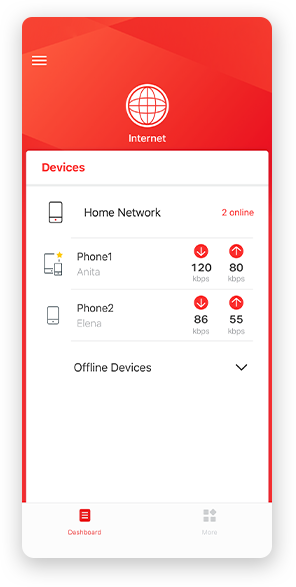
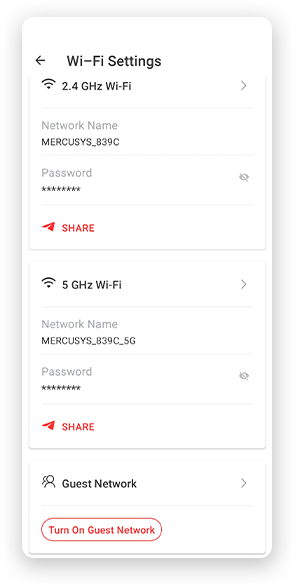
Aviso: la página de configuración de diferentes modelos puede ser diferente, consulte la actual.
Potentes controles parentales
Administre fácilmente el tiempo y el contenido en línea de sus hijos para crear un entorno en línea seguro y saludable.
-
Crear perfiles de usuario
Cree un perfil para cada miembro de la familia que le gustaría administrar. Asigne dispositivos al perfil para establecer controles de acceso y límites de tiempo para ellos.
-
Límites de tiempo en línea
Establezca límites diarios sobre el tiempo que sus hijos pasan en línea y evite que accedan a Internet en sus dispositivos durante mucho tiempo para desarrollar un hábito de red saludable.
-
Bloquear sitios web inapropiados
Controle qué sitios visitan sus hijos configurando una lista de bloqueo.
-
Pausar la conexión a Internet
Suspender las conexiones a Internet de los miembros de la familia para tomar un descanso del mundo virtual y disfrutar de un tiempo en familia.
Administre y proteja su red doméstica
La aplicación MERCUSYS lo ayuda a administrar su WiFi en casa o fuera a través de sus dispositivos iOS o Android.

Comprobar el estado de los dispositivos conectados
Vea intuitivamente el estado de funcionamiento de su red Halo y vea qué está conectado. Priorice o bloquee los dispositivos según sea necesario.

Calidad de Servicios
Prioriza los dispositivos que seleccione para un mejor rendimiento.

Alerta de acceso a nuevo dispositivo
La aplicación MERCUSYS envía de manera proactiva una alerta para informarle cuando se conecta un dispositivo desconocido. Toque para bloquear el dispositivo si es un riesgo de seguridad.

Configurar una red de invitados
Proporciona una red separada para invitados para garantizar su seguridad y privacidad.
Todo en una aplicación
Ya sea que esté buscando controlar una amplia gama de enrutadores, extensores o sistemas de malla Halo MERCUSYS, encuéntrelo todo en la aplicación.
Ver lo que es compatibleProductos compatibles
Nota: Tanto las versiones de hardware enumeradas como las superiores de estos modelos son compatibles con la aplicación MERCUSYS.
CATEGORÍA
-
Malla de halo
-

Halo H50G V1 UE
Sistema Wi-Fi en malla para todo el hogar AC1900
-

Halo H30G V1 UE
Sistema Wi-Fi en malla para todo el hogar AC1300
-
-
Enrutadores Wi-Fi
-

MR30G V1 BR
Enrutador Gigabit inalámbrico de doble banda AC1200
-

MR70X V1 UE/EE. UU.
Enrutador Wi-Fi 6 de doble banda AX1800
-

MR50G V1 UE/EE. UU./RU
Enrutador Gigabit inalámbrico de doble banda AC1900
-
Próximamente

MR30G V1 UE/EE. UU./RU
Enrutador Gigabit inalámbrico de doble banda AC1200
-
-
Extensores de rango
-
* Próximamente habrá más dispositivos compatibles.
-
Compatible con varios idiomas
La aplicación MERCUSYS admite hasta 26 idiomas, lo que permite una fácil administración de la red para usuarios de todo el mundo.
-
inglés
-
Holandés
-
Francés
-
Alemán
-
Italiano
-
japonés
-
coreano
-
portugués
-
Español
-
chino tradicional
-
idioma ruso
-
Portugués - Brasil
-
Español
(Latinoamérica) -
búlgaro
-
Lenguaje Ukraniano
-
Polaco
-
Rumania
-
eslovena
-
tailandés
-
turco
-
checo
-
vietnamita
-
Eλληνικά
-
malayo
-
húngaro
-
abrí
-
Inalámbrico

| Estándares Inalámbricos |
Compatible with 802.11ax/ac/a/b/g/n Wi-Fi standards |
|---|---|
| Velocidades WiFi | 1201 Mbps (5 GHz) + 300 Mbps (2.4 GHz) |
| Sensibilidad de Recepción |
11g 6Mbps: -96dBm |
| Seguridad Inalámbrica | WEP |
| Funciones Inalámbricas | Enable/Disable Wireless Radio, WMM |
-
Funciones de Software
| Tipo de WAN | Dynamic IP/Static IP/PPPoE/L2TP/PPTP |
|---|---|
| Gestión | Access Control |
| DHCP | Server, DHCP Client List |
| Reenvío NAT | Port Forwarding, Port Triggering, UPnP, DMZ |
| Seguridad Firewall |
SPI Firewall, IP and MAC Address Binding |
| Red de Invitados | 2.4 GHz Guest Network, 5 GHz Guest Network |
| Servidor VPN | OpenVPN, PPTP supported |
-
Características de Hardware
| Dimensiones (An x Pr x Al) | 8.2 × 6.8 × 1.6 in (208.8 × 171.6 × 41.7 mm) |
|---|---|
| Interfaces | 1× Gigabit WAN Port + 3× Gigabit LAN Ports |
| Botón |
Reset/WPS Button |
| Tipo de Antena |
4× 5 dBi Fixed Omni-Directional Antennas |
-
Otros
| Contenido del Paquete | • AX1500 Wi-Fi 6 Router MR60X |
|---|---|
| Entorno Operativo | • Operating Temperature: 0°C~40°C (32°F~104°F) |